GLAZE field guide · Documentation reviewed October 21, 2026
GLAZE CRT vs CRT Factory
A first-party, documentation-based comparison of workflows, with clear limits.
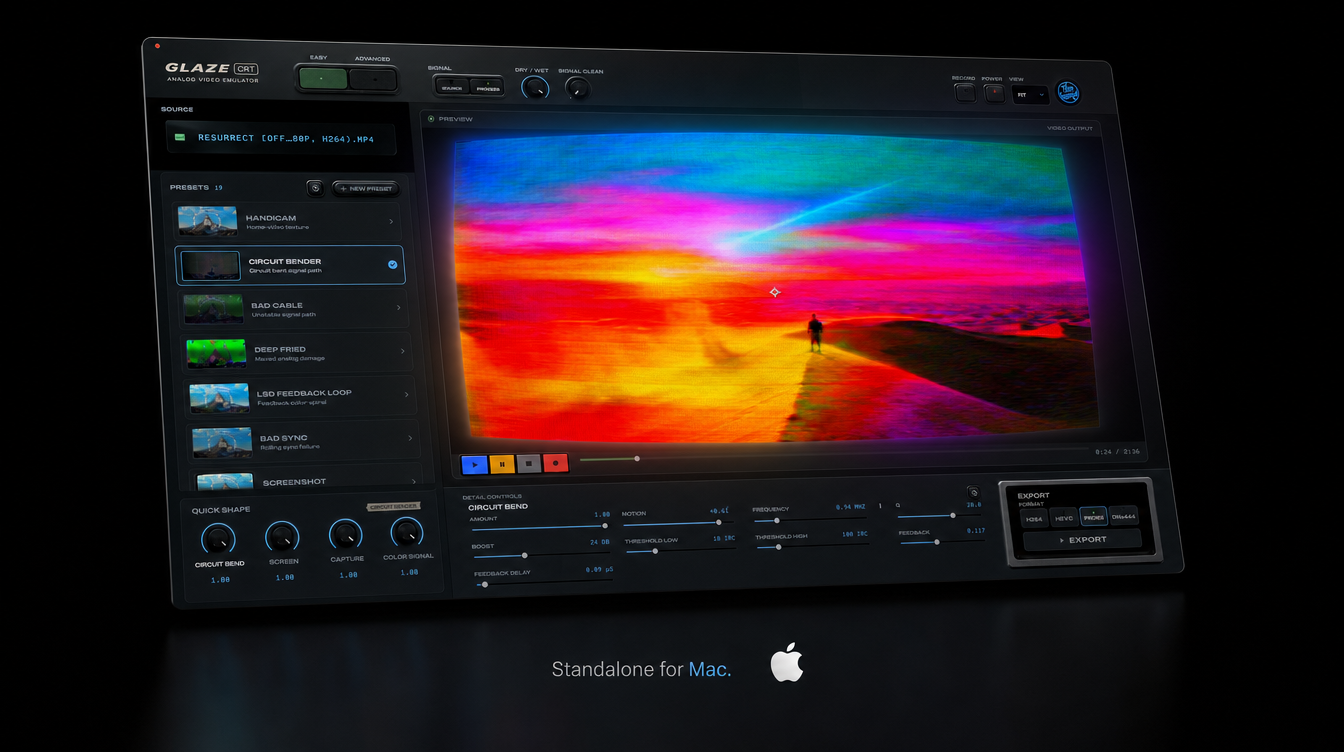
Documented workflow comparison
| Question | GLAZE | CRT Factory |
|---|---|---|
| Editing hosts | After Effects, Premiere Pro and DaVinci Resolve package. | After Effects and Premiere Pro, per official vendor page. |
| Separate application | Standalone package offered. | No standalone claim established by this review. |
| Transition workflow | No equivalent transition claim made here. | Premiere transition documented by vendor. |
| Commercial terms | One-time purchase; current offer on product page. | Check current vendor terms; not independently verified here. |
| Evidence level | Released manual and current package information. | Vendor documentation; no comparative render or benchmark. |
Start with the workflow you need
Disclosure: Faceworld makes GLAZE. This comparison is based on published documentation and the current Faceworld package structure. It is not an independent review, a speed benchmark or a same-shot visual test. We have not rendered CRT Factory alongside GLAZE for this article. Where a capability is documented by the other vendor, we identify that source rather than presenting it as our own test result.
Both products can be relevant to an editor looking for a stylized screen treatment. The useful first question is where the work needs to happen. If your edit lives entirely in After Effects or Premiere Pro, compare the available controls and workflow in that host. If you need a separate application or a Resolve workflow, check the package that actually provides it. Choosing the right format matters more than comparing a list of evocative preset names.
What the documentation establishes
ProductionCrate’s official CRT Factory page identifies After Effects and Premiere Pro support. It documents controls covering pixel structure, scanlines, screen distortion, blur, glow and color, and describes a Premiere transition. These are vendor-documented features, not a claim that we tested their appearance, performance or compatibility on your system. Check the vendor’s current requirements and commercial terms before deciding to purchase.
GLAZE is offered as Standalone, Adobe + DaVinci, and Complete. Standalone provides the application. Adobe + DaVinci provides plugins for After Effects, Premiere Pro and DaVinci Resolve. Complete combines the application and plugins. The GLAZE control reference documents both screen-related and signal-related groups, and explains that control names can differ between interfaces. Package scope should not be confused with proof that every operating-system, hardware and host combination has been qualified.
For GLAZE’s Mac workflow, the current manual specifies macOS 14 or later and a Metal-capable Mac. Physical Intel validation remains pending, so buyers using Intel should contact support before purchasing. Windows ARM is not supported by the current offer. This comparison does not fill missing Windows GPU requirements or tested host-version lists with assumptions. Use the downloads page and the applicable manual for current installation information.
Compare controls in the context of an edit
A long control list does not tell you how quickly you will reach the look a shot needs. Choose a representative clip and identify the changes you want to make: screen texture, highlight appearance, color separation, curvature or signal disturbance. Then compare how each documented workflow lets you make those changes. Treat any untested behavior as a question to answer, not as a disadvantage assigned to a competitor.
The GLAZE manual recommends starting from a factory look and adjusting one setting or group at a time. It describes Quick Shape and detail controls, along with distinct preset-saving workflows for the app and Adobe panel. If you already use ProductionCrate tools, reviewing CRT Factory’s own documentation may be the most efficient way to assess whether its workflow fits your current process. Familiarity can be a practical advantage, but it is personal to the editor.
For Premiere users who specifically need a transition, CRT Factory’s documented transition is a relevant feature to investigate. For users who want GLAZE’s Standalone or Resolve formats, those packages are relevant to investigate. Neither observation establishes a universal winner, a more accurate physical model or better image quality. The comparison should help you choose what to test, not substitute marketing language for that test.
Keep pricing and compatibility current
GLAZE’s regular US-dollar package prices are $84 for Standalone, $84 for Adobe + DaVinci and $99 for Complete. It is a one-time purchase. Temporary offers can change the amount due, so the product page and checkout are the place to confirm the current price and terms. This article does not introduce a discount or promise that an existing offer will remain available.
We are not publishing a CRT Factory price, subscription requirement or trial limitation here without a current commercial-terms verification. Product catalogs and licensing can change, and an older description should not be repeated as if it were today’s checkout. Follow the official product link to review the current offer. This also avoids comparing a temporary GLAZE sale with an outdated competitor price.
Check the exact edition of your editing application. The GLAZE page does not claim confirmed support for every Resolve edition, and Mac App Store compatibility remains unconfirmed. A host name in a package description is not a guarantee about every distribution or version. If your setup falls outside the documented qualification, ask before buying rather than infer support from a screenshot.
What a fair visual or speed test would require
A meaningful comparison needs the same input clip, frame range, output size and presentation conditions. Record each installed product version, the host version, hardware, color settings and the settings used to make the look. Show the clean input as well as both outputs. If the goal is to compare a similar appearance, explain how you matched it; identical numerical settings across unrelated products do not establish an equivalent effect.
For performance, separate preview responsiveness from final export time. Keep the test conditions and measurement method consistent, and do not promote one unusually favorable shot into a general speed claim. This page has no such measurements. It therefore makes no claim about which product is faster, uses less memory or supports a higher-quality processing path.
The same caution applies to alpha, bit depth, temporal behavior and preset counts. A codec label or a colorful interface does not prove those capabilities. Report vendor documentation as documentation and measured behavior as measured behavior. We will not add a winner, review score, quotation or comparison render that has not actually been produced and checked.
Choose your next step
If you work in Adobe applications and want to explore CRT Factory, begin with ProductionCrate’s official feature and installation information. If you need GLAZE’s documented application or plugin packages, begin with the product page and the manual for that format. Review the requirements before spending time on installation or committing a project to a new tool.
For either workflow, choose one representative clip and one achievable visual goal. Save the clean version, build the treatment, then inspect a short exported file. Watch the moving result and evaluate the final viewing size. The most useful choice is the tool and format that meet your actual project requirements, with purchase terms and compatibility you understand.
The illustration on this page is the GLAZE interface, not a competitor screenshot or a comparative output test. GLAZE 2.0 research is excluded from current-release claims. A future same-shot comparison would require legitimate access to both products and a documented test; this article does not imply that work has already been completed.