GLAZE field guide · Documentation reviewed October 21, 2026
CRT emulation vs VHS emulation
Separate the appearance of a display from the character of a tape recording.
Separate the source of the look
| Look or artifact | Useful distinction |
|---|---|
| Screen pattern, glow or curved presentation | Display-inspired treatment; not proof of a specific physical CRT. |
| Dropouts, tracking or head-switching noise | Tape/playback problems described in the CCI VHS reference. |
| Composite-video artifacts | Signal-path behavior; not exclusive to VHS. |
| Color treatment or graphic overlay | Creative treatment; alone it does not establish a tape or display simulation. |
A display and a recording are different things
CRT and VHS are often used as shorthand for the same nostalgic image, but they describe different parts of a viewing experience. CRT refers to a display technology; VHS is a videotape format. A picture can be recorded on tape, played through a video connection and viewed on a screen. Each stage can contribute something different to the final appearance. Thinking about the stages separately gives you a more useful creative starting point than adding every effect associated with old video at once.
For an editor, the practical question is what the image is supposed to represent. A close-up of a television in a scene needs a screen treatment that fits the shot. A home-video insert may need recording character even when it fills the frame without a visible television. A music-video transition can borrow from both without pretending to be an archival recording. Establish that intention before choosing controls or evaluating a preset.
What belongs to the screen, and what belongs to tape?
A display-inspired treatment can emphasize a fine screen pattern, luminous highlights, curved framing or separated color edges. Those are useful visual categories, but a decorative overlay alone does not establish a physically accurate display simulation. The exact appearance depends on the intended screen reference and how it is being represented. Avoid treating every CRT as a single universal look.
Tape and playback problems are another category. The Canadian Conservation Institute’s VHS digitization bulletin describes defects such as dropouts, tracking problems, time-base errors and head-switching noise. These references help distinguish a recording or playback disturbance from a screen texture. The bulletin is preservation guidance, not a recipe for adding damage to a new clip. Use it to understand terminology rather than to claim that a particular effect setting reconstructs an actual damaged tape.
Some artifacts arise elsewhere in the video chain. Composite-video artifacts, for example, are not uniquely evidence of VHS. That matters when naming examples: a caption such as signal disturbance is more defensible than assigning a specific tape fault you have not identified. A useful guide should tell viewers what a treatment changes without implying that the software or example has undergone a hardware comparison that never happened.
Build a comparison that answers a question
Start with the same clean shot for every version. Match its start frame, duration, framing and presentation size. Make one version that concentrates on display texture, another that concentrates on recording or signal disturbance, and a third that combines the ideas. Label each version by what you deliberately adjusted. Keep a clean reference available throughout the review.
Watch motion in addition to still frames. An effect that seems convincing on a single image may distract from a moving subject or obscure a cut. Compare dark areas, highlights and fine edges, then review the clip at the delivery size. If one version is much brighter or differently cropped, correct that presentation difference before judging the character of the treatment. Otherwise the comparison may reward exposure or framing rather than the effect you intended to study.
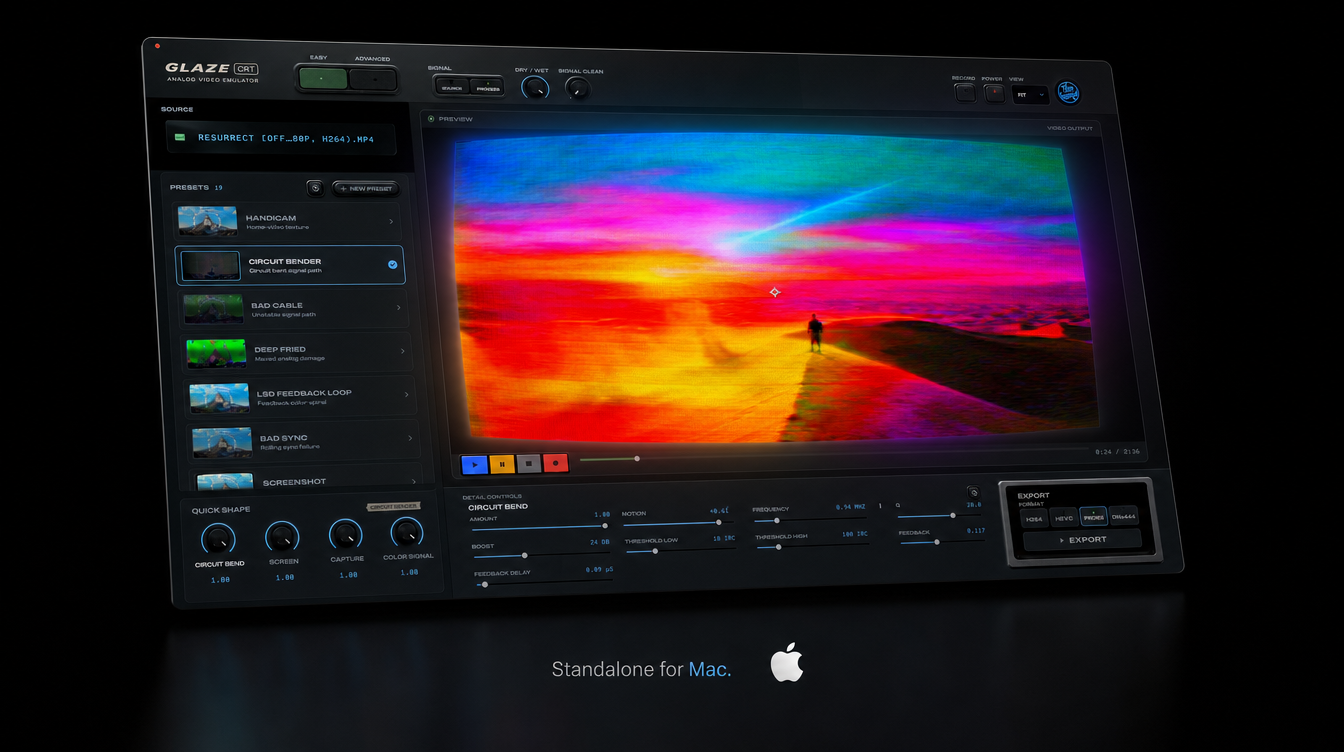
This is a suggested comparison method, not a claim that the images on this page are a completed CRT-only, VHS-only and combined test. The interface illustration shows the product interface. It does not stand in for same-frame effect evidence. A true illustrated comparison needs the actual source, recorded settings and exported results for each version.
Use GLAZE controls deliberately
The released Mac control reference describes GLAZE as combining damage to a video signal with the appearance of that signal on a filmed screen. Its documented groups include COLOR SIGNAL, DAMAGE, NOISE, SCREEN and CONVERGENCE, alongside other adjustments. Use the reference for the names in your installed interface because labels can differ between Standalone and native plugin controls.
For a screen-led look, begin with a suitable preset and inspect the screen-related controls before adding more damage. For a signal-led look, identify which disturbance matters to the shot and adjust that group first. Change one group at a time so you can tell which part of the image improved. A stronger effect is not automatically a better match for the creative reference.
Presets are starting configurations. The manual explains that recalling a factory preset replaces settings rather than adding another layer on top. Save a variation before exploring another look. Keep the source clip and project separately, because a personal preset stores control settings rather than the media itself. Do not assume a saved Standalone look transfers automatically into every plugin host.
Overlays, color treatments and export
A texture overlay can be useful when you want a designed surface or a consistent graphic motif. A color treatment can establish a palette. Neither choice is wrong because it is simple. Judge it against the intended result: does it help the image communicate, remain readable and hold together in motion? Avoid describing a static surface graphic as proof of signal processing, or a color adjustment as proof of a tape model.
When combining treatments, work from a clean baseline and keep the order visible in the project. Compare the isolated contributions before committing to the combined result. There is no universal effect order established by this guide; the chosen software, framing and creative intention matter. If a change makes it difficult to identify what each treatment contributes, simplify the stack and rebuild from the strongest useful part.
Export a short sample and view the actual file at its destination size. In GLAZE, SD, HI and FULL refer to processing choices, not an instruction to deliver a particular frame size. In plugin workflows, the host controls the final export. Confirm codec, framing, motion and audio separately. A strong texture can still need adjustment after compression or resizing, so evaluate the delivered file rather than only the editor viewer.
Questions to ask before choosing a look
Does VHS require visible scanlines? The format and the display are separate concepts. Choose a display texture because the image calls for it, rather than treating it as a mandatory badge of tape footage.
Can I combine CRT and VHS-inspired effects? Yes, as a creative construction. Keep the display and signal contributions understandable, and label a synthetic treatment honestly rather than presenting it as a real tape capture.
Does GLAZE’s research preview describe the current release? No. The product page distinguishes GLAZE 2.0 research from current purchased features. Use the released manual and the package you own when making a workflow decision.
What is the best starting point? Choose a representative moving shot and one visual goal. Compare against the clean source, preserve useful settings and make a short export. The result should serve the edit rather than satisfy a checklist of every possible artifact.